Improving how your domain connects to Hubb

Had an email from us about this? It’s genuine. Here’s how to check any email from Hubb.
In short
If you manage your own domain, please change your www record to a CNAME pointing to sites.hubb.digital. If your provider won’t let you change the record type, delete the A record for www and straight away add the CNAME in its place. Leave everything else as it is for now.
If we already manage your domain for you, there’s nothing to do.
These steps are for websites on Hubb’s UK platform. If your website is on our US platform, we’ll contact you directly, and you’ll use sites2.hubb.digital in place of sites.hubb.digital. If you’re outside the UK and Ireland and haven’t heard from us, please check with us before changing anything.
Why we’re asking
We’re improving the systems behind Hubb in phases, and this is the first. At the moment your domain points to Hubb using a fixed IP address. Once your www record points to sites.hubb.digital instead, we can make improvements on our side and your www address keeps working, without you needing to change it again.
If your website’s main address starts with www, almost every visitor arrives that way, so this one change looks after nearly all of them. Your address without the www (yourchurch.org.uk rather than www.yourchurch.org.uk) can’t use a CNAME, so it will need its own update in a later phase. We’ll be in touch when it’s ready.
Do I need to do anything?
-
We manage your domain (you transferred it to us, or we registered it for you): no, we’ll take care of it.
-
You manage it yourself: yes, please make the change below as soon as you can.
-
Someone else manages it for you (a web designer, IT volunteer or your registrar): please forward them this guide.
-
Not sure? Your domain is usually managed by whoever you pay for it each year. If you can’t tell, ask us and we’ll check for you.
What to change
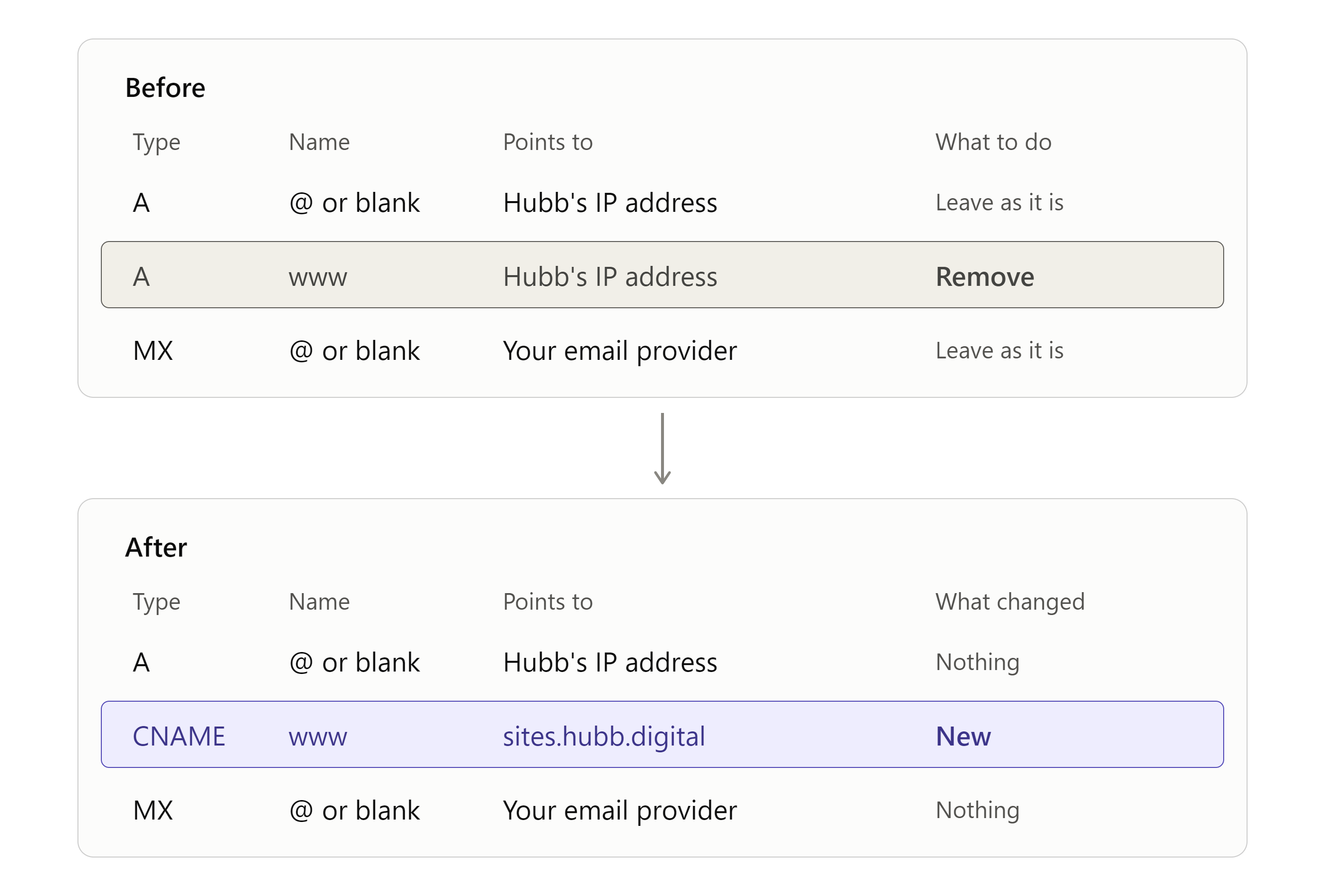
You’re changing one record. Here’s what to enter:
|
Setting |
What to enter |
|
Type |
CNAME |
|
Name (sometimes called Host) |
www |
|
Points to (sometimes called Value or Target) |
sites.hubb.digital |
|
TTL |
Leave as it is |
If your website’s address doesn’t start with www (for example news.yourchurch.org.uk), make the same change to the record for that name instead.
Before you change anything: only change a record that currently points to 85.13.213.3. If it points anywhere else, leave it alone and contact us.
Step by step
-
Log in to the company your domain is registered with, or wherever your DNS is managed.
-
Open the DNS settings. They may be called DNS management, Manage DNS, DNS records, Advanced DNS or Zone editor.
-
Find the record named www:
-
if it already points to sites.hubb.digital, you’re done and there’s nothing to change;
-
if it’s an A record pointing to 85.13.213.3, change its type to CNAME and its value to sites.hubb.digital, then go to step 5. If your provider won’t let you change the type, delete it and go straight on to step 4;
-
if there’s also an AAAA record named www, delete that too;
-
if it points anywhere else, including a CNAME to your own domain, a different IP address or another company’s website, leave it alone and contact us.
-
If you deleted the old record, straight away add a new record with the type CNAME, the name www, pointing to sites.hubb.digital. Enter just “www” as the name, not your full address. Some providers add a full stop to the end of sites.hubb.digital automatically, which is fine. If yours shows sites.hubb.digital.yourchurch.org.uk after you save, edit the value and type sites.hubb.digital. with a full stop at the end.
-
Save. Some providers save each record as you go, and others have one save button for everything. Either way, make the changes in one sitting, adding the new record straight after removing the old one.
Using Cloudflare? Set the new record’s Proxy status to DNS only (grey cloud). If it’s left as Proxied, parts of your web office may not work properly.
Can’t find your DNS settings? Search your provider’s help pages for “add a CNAME record”, or ask us and we’ll help.
Why can’t I just add the CNAME alongside the old record? A CNAME can’t share its name with any other record, so the old www record has to be changed or removed first.
After you’ve made the change
Your website keeps working while you make the change. It usually takes effect within an hour, and occasionally up to 24 to 48 hours while computers around the internet catch up. If you’d like us to check it’s worked, just let us know.
Please leave these alone
-
The record for your address without the www. Your provider may show its name as @, leave it blank, or use your full domain name. It stays exactly as it is for now.
-
Anything to do with your email. That means MX records, TXT records (including SPF, DKIM and DMARC), and records such as mail or autodiscover.
-
Any other record you don’t recognise.
Would you rather we looked after it?
Once you’ve made this change, we recommend transferring your domain to us. We’d then make every future update for you as soon as it’s needed, including the one for your address without the www, and look after the records that protect your email. It costs from £1.50 a month including VAT, with full pricing at hubb.church/domains. You keep full ownership of your domain, and if you ever leave Hubb, we hand it straight back.
Ask us to manage your domain
Is this really from Hubb?
-
The address we ask you to use. For this change, it’s sites.hubb.digital, or sites2.hubb.digital for websites on our US platform. Hubb Digital Ltd is the company behind Hubb, which is why it uses hubb.digital.
-
What we never ask for. We’ll never ask for your password, your domain login details or your card details by email, and we’ll never ask you to change your email records.
-
Where to check. Whenever we ask you to change your domain settings, you’ll find the same details here on our support site.
-
If you’re unsure about an email, don’t click its links. Type support.hubb.church into your browser instead, or email us at support@hubb.digital. There’s also a copy in the Broadcasts panel in your web office.
Need help?
Reply to our email, chat with us at support.hubb.church, or use our support request form.